
MATLAB® and Simulink® have become globally established environments for a wide variety of applications, even among budding engineers. There are many reasons for this development. MATLAB® and Simulink® provide solutions in which you can focus on the engineering task. This is perfect for didactic concepts in teaching environments and efficient in industrial applications.
Advantages of MATLAB® and Simulink®
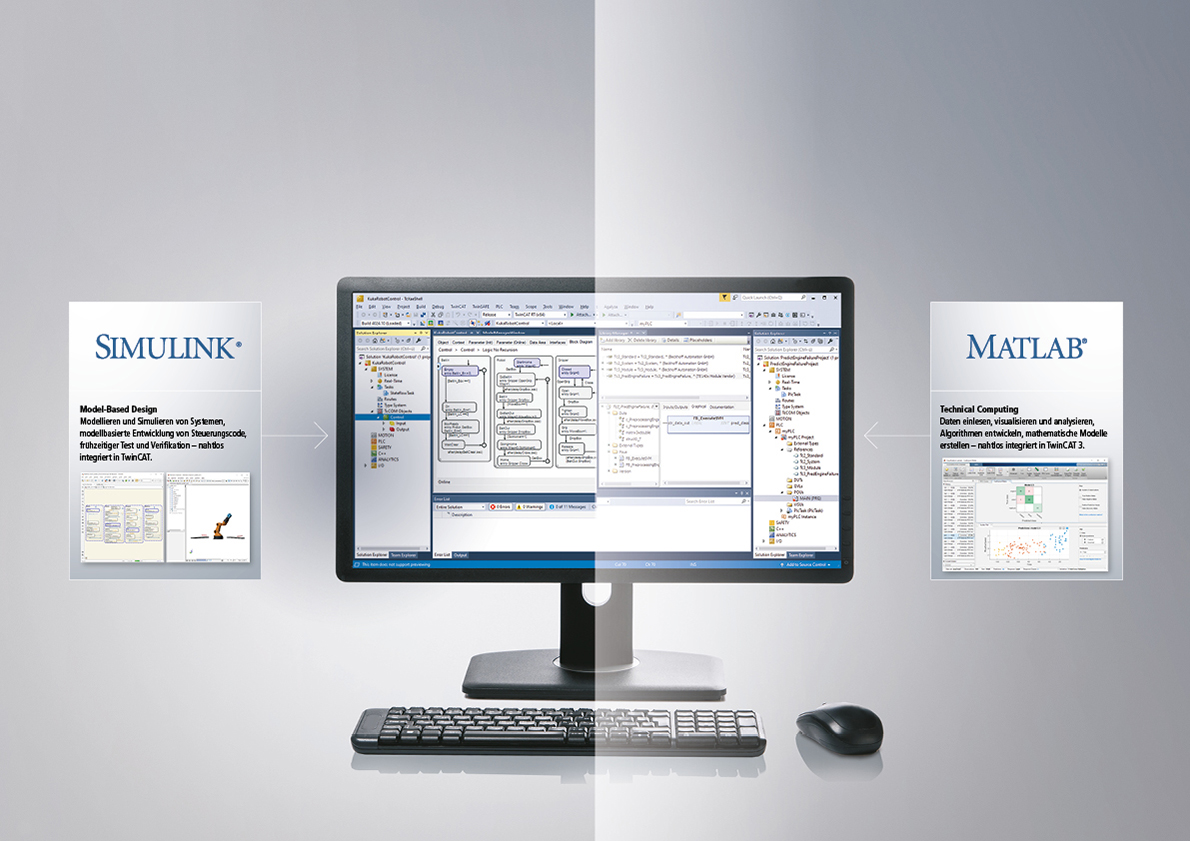
- early validation of software functionality through simulation
- virtual commissioning based on physical model
- direct import of CAD models
- development and testing of control software and process logic
- analysis of measurement and process data
- interactive apps for the development of algorithms
- training and optimization of AI algorithms
- parallel computing
From MATLAB® and Simulink® to TwinCAT 3
Using TE1401 TwinCAT 3 Target for MATLAB® and TE1400 TwinCAT 3 Target for Simulink®, it is possible to execute the analyses and simulations developed in the globally used MATLAB® and Simulink® programming languages in TwinCAT runtimes in hard real time. The programming, which was first validated and transferred to the actually connected TwinCAT system landscape, can immediately assume the control and monitoring tasks in the customer applications as a productive code without incurring any risk of unforeseeable errors in the development phase.

TwinCAT 3 Target for MATLAB® enables MATLAB® functions to be used in TwinCAT 3. The functions are automatically transferred to TwinCAT objects and used seamlessly in TwinCAT 3 Engineering. The modules that are automatically generated can be integrated both as a TcCOM object and as a PLC function block in the TwinCAT solution. The inserted modules are downloaded with the complete TwinCAT project to the TwinCAT 3 runtime environment, where they are executed within the real-time environment like all other objects.
Predictive maintenance, machine learning, or testing and measurement technology – these MATLAB® key functions can be seamlessly integrated in the control with TwinCAT 3 Target for MATLAB®.
Predictive maintenance is one of the most important factors for increasing OEE. The Predictive Maintenance ToolboxTM from MathWorks® is ideal for developing state indicators and making predictions. The integration of algorithms in the PLC makes it possible to synchronously access all relevant machine data. The monitoring system is transparently integrated in the control and is not a separate black box solution.
Machine learning functions from MATLAB®, in combination with TwinCAT 3, present huge advantages, with classifiers able to perform product tests synchronously and directly in the control or detect system faults. Regression algorithms execute virtual sensors, parameterize a system depending on the situation, or are embedded directly in a control loop for model-predictive regulation. The algorithms are trained outside TwinCAT real time and can be changed on the fly during runtime without stopping the machine.
The integration of testing and measurement technology in the machine control system reduces the complexity and costs of the test systems, makes engineering easier, and leads to faster testing processes. The Beckhoff I/O portfolio provides the raw data to the control. There, the data can be both saved directly in databases for documentation and (pre-)processed in the real-time environment. The extensive MATLAB® signal processing algorithms, in combination with integrated simulation models for HiL testing, create an outstanding basis for implementing integrated, modern, and powerful test systems.

With TwinCAT 3 Target for Simulink®, it is possible to make models developed in Simulink® usable in TwinCAT 3. Various toolboxes such as SimScape™, Stateflow®, or DSP System Toolbox™ can be integrated in Simulink®. Embedded MATLAB® function blocks are also supported. The models are automatically compiled in C/C++ code with the aid of the Simulink® Coder™ and transformed into TwinCAT objects with TwinCAT 3 Target for Simulink®. TwinCAT objects created from Simulink® have the same interfaces and properties as all other TwinCAT objects. They can be used fully in TwinCAT 3 Engineering; for example, extended with PLC source code to create an overall project, debugged, and linked with fieldbus devices. The block diagram visualization from Simulink® is applied in TwinCAT Engineering. In addition to Simulink® External Mode, the block diagram embedded in the engineering can be used as a control for parameter adjustment, for debugging, and for signal and state monitoring. The automatically generated modules can be integrated in the TwinCAT solution as TcCOM objects on the one hand and as PLC function blocks on the other. The inserted modules are downloaded with the complete TwinCAT project to the TwinCAT 3 runtime environment, where they are executed within the real-time environment like all other objects.
TwinCAT objects can be assigned to different CPU cores in the real-time environment. This means that even large projects can be easily scaled – for example, in order to simulate an entire wind farm. If speed is required in individual objects, it is also possible to parallelize calculations on several cores. This means that applications from simple controllers to complete machine control systems and real-time simulations benefit from end-to-end support with a single tool.
Analyses and simulations created in MATLAB® or Simulink® can be connected with the TE1410 TwinCAT 3 Interface for MATLAB® and Simulink® to TwinCAT runtime environments via a high-performance communication interface. The MATLAB® functions or Simulink® models are run in the MATLAB® or Simulink® process, and these processes can exchange data bidirectionally with the TwinCAT runtimes. With TF6701 TwinCAT 3 IoT Communication, the communication functionality can also be transferred to the ThingSpeakTM IoT platform.
The TwinCAT 3 Interface for MATLAB® and Simulink® enables data exchange between MATLAB® and the TwinCAT runtime, and between Simulink® and the TwinCAT runtime.
Data communication between Simulink® and TwinCAT: For Simulink®, ADS client blocks that can be simply integrated and configured in Simulink® are provided in the Simulink® library. When working from the Simulink® environment, this means it is possible to write data to a TwinCAT runtime or read data from it. One application example involving the use of ADS blocks in Simulink® is the further processing of data from real time for non-real-time tasks, such as extended runtime testing and monitoring tasks.

Data communication between MATLAB® and TwinCAT: An ADS Port object that can be used in the script environment is provided for MATLAB®. The object offers various methods for data exchange between MATLAB® and the TwinCAT runtime. In addition to an ADS client in MATLAB® − i.e., the MATLAB® environment initiates the data exchange – the use of an ADS server in MATLAB® is also possible. The latter offers the option of writing MATLAB® functions within the MATLAB® environment and calling them from TwinCAT via an ADS command. An application example for the use of the ADS client in MATLAB® is the creation of a graphical user and monitoring interface; for instance, based on a MATLAB® app. The ADS server can be used, for example, to execute non-real-time-relevant tasks, such as components of a predictive maintenance system or a parameter optimization. The MATLAB® CompilerTM can be used to execute the programs created as stand-alone applications in the field – e.g., on an edge device or directly on the industrial PC.

TE1421 TwinCAT 3 Simulation Runtime for FMI connects TwinCAT control logic directly with FMI-capable simulation tools. This is ideal for software-in-the-loop (SiL) simulation with Simulink®.
The solution can be configured quickly and is based on the TwinCAT 3 Usermode Runtime, which is executed synchronously from within the simulation tool. As described in the adjacent video, the Usermode Runtime, including the interface description, is exported as an FMU (Functional Mock-up Unit) and integrated into Simulink® via the FMU Import Block.
This allows TwinCAT code to be executed synchronously in the simulation environment – for example, in combination with Simscape™ Multibody™ for motion models and virtual commissioning.

Day after day, machines and systems produce more and more data. Connected machines and intelligent modules form the (Industrial) Internet of Things as the basis for smart industry. The promise of smart industry is to transform these vast amounts of data into valuable information and competitive and economic efficiency advantages. This can only succeed if the data is not only reduced to the essential information and analyzed, but also transferred between the different parties in a meaningful, timely and secure manner.
To enable the use of data for value-added services, ThingSpeakTM from MathWorks® provides a secure data exchange platform in combination with the powerful data processing, analysis, and visualization capabilities of MATLAB® and its add-on toolboxes.
TwinCAT 3 IoT Communication provides basic functions for sending and receiving data via what is known as the MQ Telemetry Transport (MQTT) protocol in the form of PLC libraries. The PLC library can be used to establish a bidirectional data connection between TwinCAT and the ThinkSpeakTM IoT platform. Anchoring the networking functionality directly in the machine control system, and thus regarding it as an integral part of a machine, offers maximum flexibility in the data flow from the sensor to the cloud.
MATLAB® and Simulink® customer applications in TwinCAT 3


Test system of a heavy-duty bearing test bench for main bearings of wind turbines
Using leading automation technology, wind turbines with diameters of up to 6 meters can be tested on the world’s most powerful heavy-duty bearing test bench for SKF main bearings. The highly complex control system was developed and tested in MATLAB® and Simulink®, and does not need to be re-programmed for the controller. The test bench is a custom-made product, which means that the control cannot be tested on a prototype. It was possible to meet this challenge thanks to the automatic code generation and integration of the controller developed in MATLAB® and Simulink® into the test bench control system (Rapid Control Prototyping), and the virtual commissioning of the controller based on a model of the machine.
This made it possible to reduce not only risks arising from malfunctions during commissioning, but also commissioning time and costs.

Yarn and fiber production with the Zero Twist Feeder
The Zero Twist Feeder feeds yarn into weaving machines without a single rotation. Weaving machines operate at high speeds and pull on the spool at highly irregular intervals. A buffer arm is used to balance between the spool and the gripper. The buffer arm feeds the weaving machines with the exact required amount of yarn at optimum speed for weft insertion. Speeds of up to 850 meters/minute per entry can be achieved during production. The problem that can arise when weaving carbon fibers, glass fibers, or plastic strips is the occurrence of twists or loops at these high speeds.
The problem was solved by first creating a digital twin of the machine. The programming of the entire software was done in Simulink®. The model was divided into several partial models that each represented an aspect of the mechanical engineering. Before IRO tested the algorithms on the actual hardware in Sweden, Vintecc conducted extensive virtual simulations in Belgium to ensure the machine worked as designed.
Combining Simulink® with the Beckhoff TwinCAT technology via TwinCAT 3 Target was a huge advantage in this application since no PLC code is required. The model could be directly integrated in detail into TwinCAT. Changes made to the parameters in the model, TwinCAT, or the hardware can be immediately transferred.

Magway Transport system – shifting a sophisticated algorithm to the lowest possible level
Magway uses MATLAB® and Simulink® to implement encoderless control of linear synchronous motors that allow for autonomous, sustainable package delivery through subsurface tubes.
Using TwinCAT Target for Simulink®, control algorithms are implemented directly on an industrialized platform – with fewer components, decentralization, higher system availability, and shorter development cycles. This way, the development cycles are shortened thanks to the in-loop debugging. The core IP was developed in MATLAB® and Simulink®. By using this software directly instead of through an inconvenient port, Magway always has the right tool for the right job.

Control software for 6 MW offshore wind turbines
Offshore wind turbines must ensure high availability levels with low maintenance requirements. The operation of these turbines must be predictable and safe to control at all times. It is almost impossible to test the highly sensitive control software under real conditions.
By using the concept of model-based design with Simulink® and TwinCAT, each function of the system can be developed, tested, and verified. The safe and reliable control software can also be developed faster and more cost-effectively. This is possible because the easy integration of Target for Simulink® in the model-based design process ensures the efficient generation and testing of productive codes on an industrial platform. Furthermore, the communication capabilities of the interface for MATLAB® and Simulink® provide all the tools required for comprehensive software-in-the-loop testing after the code is implemented on the Beckhoff controller.
At the same time, the TE1400 and TE1410 functions resulted in successful application of the main control software designed in Simulink® for not only the 6 MW prototype turbine but also each large-scale turbine that followed the prototype.

Simutopia is a consulting company working in the software and engineering sector and specializing in model-based development. It has in-depth experience in developing machine models that can be used for design analysis, control implementation, real-time simulation, and testing. Expert knowledge is used to leverage the combined power of MathWorks® and Beckhoff software tools for rapidly implementing and iteratively optimizing advanced control algorithms on the TwinCAT platform. Simutopia is a member of the Beckhoff Integrator Group (BIG).
Developing control algorithms for robotic systems includes creating kinematics and dynamics models of the robot mechanisms. These models can be quite complex depending on the robot topology and number of degrees of freedom. With the aim of developing models of this kind easily using SimscapeTM MultibodyTM, and offering customers efficient and cost-effective solutions, Simutopia has developed a specific application in MATLAB®: NewtonsLab. TwinCAT 3 Target for MATLAB® and TwinCAT 3 Target for Simulink® are used to automatically execute these developed models for real-time control in the TwinCAT runtime directly from NewtonsLab. In addition, the TwinCAT 3 Interface for MATLAB® and Simulink® enables live streaming of data between TwinCAT and NewtonsLab via ADS. This allows control parameters to be changed quickly and the code implemented on TwinCAT to be validated with the same inputs by comparing the virtual machine with the real hardware. This is exceptionally useful, especially when it comes to developing prototypes rapidly and testing the control algorithms.
If you also have similar examples of applications and questions about the integration of your MATLAB® and Simulink® projects in a TwinCAT software environment, please contact your sales representative or use the contact form:
Products

TE1400 | TwinCAT 3 Target for Simulink®
TwinCAT 3 Target for Simulink® provides an interface between Simulink® and TwinCAT. The Simulink® software is developed and distributed by the MathWorks company. The programming environment is based on MATLAB® and is widely used both in science and in industry. Simulink® is a graphic programming environment that is ideally suited to the model-based development process. Simulation models of systems can be created and, for example, control and feedback control algorithms in order to test the models created.
TE1401 | TwinCAT 3 Target for MATLAB®
TwinCAT 3 Target for MATLAB® provides an interface between MATLAB® and TwinCAT. MATLAB®, the language of technical computing, is developed and distributed by the MathWorks company. The programming environment is widely used both in science and in industry. MATLAB® is a script language that is ideally suited for the development of algorithms and mathematical models.
TE1402 | TwinCAT 3 Target for Embedded Coder®
The TE1402 TwinCAT 3 Target for Embedded Coder® is an extension of the TE1400 TwinCAT 3 Target for Simulink®. Building on the existing capabilities of the TwinCAT 3 Target for Simulink®, which uses the Simulink® Coder™ (GRT target) from MathWorks for automatic code generation, the TE1402 also makes it possible to use the Embedded Coder® (ERT target) from MathWorks. The TE1402 essentially leverages the functions of the TE1400 while also harnessing the properties of the Embedded Coder® to achieve target platform specialization. For example, CPU-specific command extensions can be used to make models created on the Beckhoff Industrial PC run faster.
TE1410 | TwinCAT 3 Interface for MATLAB® and Simulink®
MATLAB® and Simulink® are developed and distributed by the MathWorks company. The two programming environments are widely used both in science and in industry. Simulink® is a graphic programming environment that is ideally suited to the model-based development process. MATLAB® is a script language for the development of algorithms and mathematical models.

TE1421 | TwinCAT 3 Simulation Runtime for FMI
The TwinCAT 3 Simulation Runtime for FMI provides an interface for simulation tools that support the Functional Mockup Interface (FMI). The interface is based on the TwinCAT 3 UserMode Runtime, which can be accessed in sync from the simulation tool. This is exported to an FMU together with an interface description configured in TwinCAT, and can be imported into any simulation tool that supports the FMI interface as a co-simulation. Support is offered for both FMI 2.0 and 3.0. The TwinCAT project that is being executed in the FMU can also be part of the FMU; however, it is also possible to connect to this UM runtime with a TwinCAT engineering system and monitor or modify the code executed in the FMU in TwinCAT.

TF6701 | TwinCAT 3 IoT Communication (MQTT)
TwinCAT 3 IoT Communication provides basic functionalities in the form of PLC libraries for sending and receiving data via the so-called MQ Telemetry Transport (MQTT) protocol.